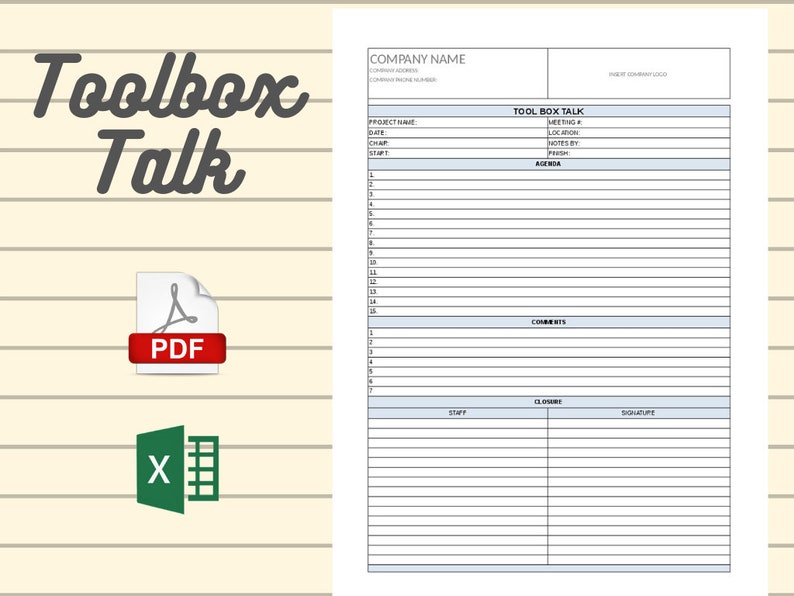
Safety doesn't happen by accident—it's built through consistent communication. Yet, one of the most effective safety tools, the toolbox talk, often gets rushed, skipped, or poorly documented. Managers scramble for structure, employees tune out, and critical risks go unaddressed. The root cause? A lack of clear, practical resources.
That’s where a quality toolbox talk template comes in. A well-designed template eliminates guesswork, ensures legal compliance, and keeps safety conversations focused and actionable. And yes—free, high-quality templates are available. But not all are created equal.
This guide cuts through the noise to deliver not just a free toolbox talk template download, but a strategic framework for using it effectively across industries like construction, manufacturing, and utilities.
Why a Template Matters for Safety Meetings
Toolbox talks—short, frontline safety meetings—are most effective when they’re structured, relevant, and documented. Without a template, teams face:
- Inconsistent messaging
- Critical topics overlooked
- No audit trail for compliance
- Low employee engagement
A template standardizes the process. It reminds facilitators to cover hazards, controls, and participant sign-offs. More importantly, it shifts the focus from paperwork to real safety dialogue.
For example, an electrical contractor using a template before starting outdoor work can quickly address arc flash risks, PPE requirements, and emergency procedures—while documenting attendance in minutes.
Key Elements of an Effective Toolbox Talk Template
A great template isn’t just a checklist—it’s a communication tool. It should include:
- Date, time, and location
- Topic and hazard focus (e.g., working at height, lockout/tagout)
- Facilitator name and role
- Attendee list with signatures
- Hazard identification section
- Control measures discussed
- Questions or concerns raised
- Follow-up actions assigned
Avoid templates that are too sparse or overly complex. A one-page format printed on site is ideal—digital versions work too, but must be accessible in the field.
One common mistake? Generic topics like “general safety.” Instead, drill down: “Using Fall Protection on Scaffolding Over 6 Feet.” Specificity drives engagement and compliance.
Free Toolbox Talk Template Download Options
You don’t need to overpay or reinvent the wheel. Several reputable sources offer free, downloadable templates in Word, PDF, or Excel formats. Here are five reliable options:

| Template Source | Format | Key Features | Best For |
|---|---|---|---|
| OSHA.gov | OSHA-compliant, simple structure | Government and public sector teams | |
| SafetyCulture (iAuditor) | PDF & editable online | Digital forms, photo uploads, analytics | Teams using mobile safety apps |
| Creative Safety Supply | Word & PDF | 50+ topic-specific templates | Manufacturing and warehouse safety |
| Site Improvement | Word | Fully customizable, fillable fields | Construction site supervisors |
| NEBOSH Sample Templates | Education-grade, hazard-focused | Training and onboarding programs |
All are free to download. The Site Improvement template stands out for field usability—clean layout, signature lines, and space for notes. SafetyCulture’s digital version is ideal for teams already using tablets or smartphones on site.
Pro tip: Always modify a free template to match your company’s branding, risk profile, and regulatory needs—especially if operating under OSHA, COR, or ISO 45001.
How to Customize Your Template for Maximum Impact
A downloaded template is a starting point. To make it stick, tailor it to your operations.
Start by auditing your top 5 job-site risks. If your team regularly works near traffic, add a section about high-visibility PPE and spotters. For welding crews, include fume extraction and fire watch reminders.
Next, localize language. Avoid jargon like “hierarchy of controls” unless you explain it. Use photos or diagrams where possible—especially for non-native English speakers.
One Midwest HVAC contractor improved participation by 70% simply by adding a “What Could Go Wrong?” box to their template. Workers used it to share near-misses, making talks more interactive.
Also, rotate topics monthly. Use a 12-month safety calendar so talks stay fresh and cover all critical areas.
When to Go Digital vs. Paper-Based
The debate isn’t about tech—it’s about usability.
Paper templates work well in remote or high-interference zones (e.g., near heavy machinery where devices aren’t safe). They’re fast, low-cost, and don’t depend on Wi-Fi. But they’re hard to archive, search, or analyze.
Digital templates (via apps like SafetyCulture, Procore, or Form.com) offer real-time updates, automatic logging, and analytics. One utility company reduced lost paperwork by 95% after switching to digital sign-offs.
Consider a hybrid model: start with paper during the meeting, then scan and upload for records. Or assign a scribe to complete a tablet-based form live.
Warning: Never let the tool slow down the talk. If tech causes delays, revert to paper and fix the process later.
Common Mistakes That Undermine Toolbox Talks
Even with a solid template, teams often fall into traps:
- Holding talks without real engagement – Reading from a script while workers stare at phones. Fix: Ask open questions. “What would you do if you saw a frayed extension cord?”
- Using the same template every week – Leads to complacency. Fix: Rotate formats—use a blank version one week, a visual hazard hunt the next.
- Skipping documentation – No signatures, no follow-up. Fix: Assign a note-taker and store records for at least one year.
- Ignoring worker feedback – Talks feel top-down. Fix: Include a “Worker Input” line and act on suggestions.
One mining supervisor increased compliance by posting monthly summaries of talk outcomes on the break room board—proving feedback was heard.
Integrating Templates into Your Safety Workflow
A template shouldn’t be a one-off. Build it into your routine:
- Schedule weekly talks every Monday at 7:00 AM.
- Assign rotating facilitators—foremen, crew leads, even experienced laborers.
- Link topics to upcoming tasks—e.g., trenching safety before excavation begins.
- Store completed forms in a central binder or cloud folder.
- Review trends monthly—are the same hazards coming up? That signals a training gap.
For high-risk projects, conduct mini talks before shift changes or task handoffs. Use a condensed version of your template—just topic, hazard, control, and sign-off.
Final Recommendations and Next Steps
A free toolbox talk template download is just the first step. The real value comes from consistent use, customization, and leadership buy-in.
Start by downloading one of the templates listed—preferably SafetyCulture or Site Improvement for their balance of structure and flexibility. Print or deploy it at your next crew meeting.
Then, refine it. Add your logo, adjust fields, and test it for three weeks. Collect feedback from workers: “Was the talk useful? Did the form help?”
Within a month, you’ll have a living safety document that doesn’t just check a compliance box—it prevents incidents.
Download. Customize. Talk. Repeat.
Frequently Asked Questions
Where can I get a free toolbox talk template? You can download free templates from OSHA.gov, SafetyCulture, Creative Safety Supply, Site Improvement, and NEBOSH sample resources.
Are toolbox talk templates OSHA compliant? Yes, if they include key elements like topic, date, attendees, hazards, and controls. OSHA doesn’t mandate a specific format but requires documentation of safety meetings.
Can I edit a downloaded template? Absolutely. Use Word or PDF editors to customize fields, add your company logo, and tailor content to your industry risks.
How often should toolbox talks be held? Weekly is standard, but frequency depends on risk. High-hazard sites may hold them daily or before critical tasks.
Do all workers need to sign the template? Yes. Signatures confirm attendance and understanding. Digital signatures are acceptable if the system is secure and auditable.
Should toolbox talks be recorded? Written documentation (paper or digital) is essential for compliance. Audio or video isn’t required but can help with training review.
What topics should I cover? Focus on current hazards: fall protection, electrical safety, PPE, equipment operation, and emergency response. Rotate topics monthly.
FAQ
What should you look for in Free Toolbox Talk Template Download for Safer Workplaces? Focus on relevance, practical value, and how well the solution matches real user intent.
Is Free Toolbox Talk Template Download for Safer Workplaces suitable for beginners? That depends on the workflow, but a clear step-by-step approach usually makes it easier to start.
How do you compare options around Free Toolbox Talk Template Download for Safer Workplaces? Compare features, trust signals, limitations, pricing, and ease of implementation.
What mistakes should you avoid? Avoid generic choices, weak validation, and decisions based only on marketing claims.
What is the next best step? Shortlist the most relevant options, validate them quickly, and refine from real-world results.





/cities-skylines-5a0ef1eabeba3300375673ba.png)
